


Table of Contents
Security policy sounds abstract until an employee needs Microsoft 365 access, a vendor requests a login, or a backup restore determines how long operations stay down. An information security policy gives those moments a documented path, so approvals, access, backups, incident response, vendors, and budget decisions do not depend on memory.
Tony Rushin, Marketing Vice President at Network 1 Consulting, notes: “Policy works when it tells the help desk, manager, and user exactly who approves access, what gets logged, and how exceptions expire.”
A useful information security policy template turns expectations into repeatable work. If you are asking what is information security policy in practical terms, think of it as documented control. That matters because nearly 60% of breaches involve a human element.
At Network 1 Consulting, we connect policy to real workflows: proactive monitoring, layered security, clear approvals, and transparent communication when something needs action.
What Is Information Security Policy For Operational Control
An information security policy is the written source of truth for how your people, systems, vendors, and data are protected. It defines who can approve access, what controls are required, and how exceptions are handled when business pressure rises.
Clear ownership has to come before tools work well, especially when 31% say policy terms are somewhat clear, 23% say clear, and 21% say mostly clear.
-
Access and identity: MFA, onboarding, offboarding, and Security Point of Contact approvals.
-
Microsoft 365 controls: Security hardening, email authentication, and administrator reviews.
-
Recovery and response: Backups, incident steps, firewall ownership, dark web alerts, and endpoint protection.
Use information security policy examples as starting points, then adapt them to your workflows, risk areas, and approval structure. During assessments, we review current infrastructure, identify red flags, document exposure, and build security plans that match how work actually gets done.
Information Security Policy Template Essentials For Small Teams
A useful template gives managers and IT a shared playbook. An incomplete document leaves gaps in approvals, enforcement, and audit readiness, especially when exceptions are handled through email threads or undocumented vendor requests.
-
Access rules by role: Define who gets Microsoft 365, shared folders, accounting software, and administrative rights.
-
Password and MFA standards: Include MFA requirements and note that memorized secrets SHALL be at least 8 characters when chosen by the subscriber.
-
Device and backup duties: Cover encryption, backup ownership, suspicious email reporting, and restore responsibilities.
-
Vendor and exception approvals: Name who approves temporary access, how long it lasts, and where the approval record is stored.
During onboarding, we inventory hardware and software, apply best practices, review cybersecurity controls, document the environment, and build the long-term IT plan. Templates should support clear approvals, not replace active management.
Information Security Policy Examples That Prevent Daily Exceptions
Policies fail when they do not match how employees request access, share files, work remotely, and report issues. A sample information security policy copied without owners and approval paths creates confusion.
-
New user requests: Dispatch follows documented user add steps, role templates, approved applications, and client-specific build notes.
-
File sharing limits: Teams know when to use SharePoint, OneDrive, or a restricted shared drive, and the ticket shows who approved access.
-
Remote access approvals: VPN, MFA exceptions, and travel needs go through the Security Point of Contact.
-
Suspicious email reporting: Users know where to send the ticket, what not to click, and how the Support Desk will respond.
The operational risk is real: policy violations caused by employees involved 51% of SMB incidents and 43% of enterprise incidents.
When a new hire starts Monday, HR needs Microsoft 365, shared drive, line-of-business application, and MFA access ready before day one. Without documented approvals, permissions get copied from the wrong person, exceptions never make it into the client knowledge base, and access decisions become harder to audit later.
Put Security Policy Into Practice
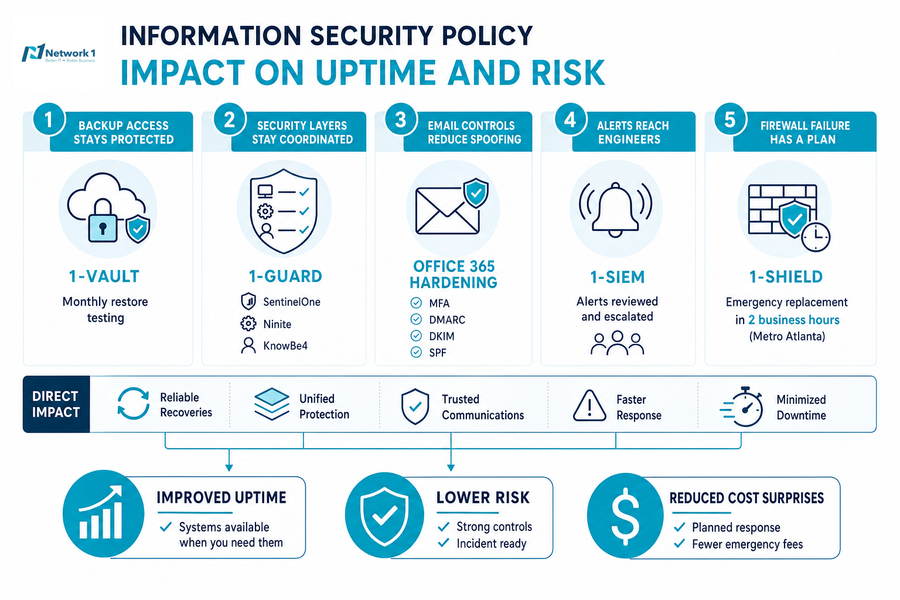
Information Security Policy Impact On Uptime And Risk
Security policy affects incident containment, backup recovery, user response, cyber insurance questions, audit friction, and whether invoices surprise you after emergency work.
-
Backup access stays protected: 25% of organizations have no policies or controls to prevent malicious access to backup infrastructure. With 1-Vault, monthly file restore testing keeps recovery front and center.
-
Security layers stay coordinated: 1-Guard uses SentinelOne, Ninite, and KnowBe4 so endpoint protection, patching, and training are coordinated. According to the 2026 findings, 75% of organizations have consolidated at least some portion of their security tools or policies under a single platform or management layer.
-
Email controls reduce spoofing: Office 365 hardening sets MFA, DMARC, DKIM, and SPF expectations.
-
Alerts reach engineers: 1-SIEM alerts go to our engineering team for review and escalation. A policy should define who receives alerts, who decides severity, and when a ticket becomes an incident.
-
Firewall failure has a plan: 1-Shield includes emergency replacement in 2 business hours in metro Atlanta when hardware failure blocks users or interrupts customer response.
Turn Policy Into Daily Control
Make access, approvals, backups, and exceptions easier to manage. Network 1 Consulting helps align security policy with real operations.
Information Security Policy Template For Small Business Rollout
Rollout is hard because security rules affect habits, managers, approvals, and daily productivity. Treat implementation as managed change, not a PDF distribution.
-
Name the owner: Assign one person to approve changes, manage exceptions, and keep the policy current.
-
Map access by role: Tie job titles to Microsoft 365 groups, applications, shared folders, mobile device rules, and MFA requirements.
-
Train through tickets: Use real Support Desk scenarios, including phishing reports, lost phones, new hire access, and remote work requests.
-
Test recovery work: Schedule restore tests and review firewall, endpoint, and backup controls before an incident forces the issue.
-
Review on cadence: Use our 30-day onboarding process, Annual Business Reviews, IT Committee meetings, 1-year or 2-year Roadmaps, and monthly Client Manager outreach.
That cadence leads naturally into the capabilities that keep the policy alive. Access management, backup testing, endpoint controls, Microsoft 365 hardening.
According to the 2026 findings, 75% of organizations have consolidated at least some security tools or policies under one platform or management layer. One vendor or one management layer reduces confusion when approvals, alerts, invoices, and accountability need a clear owner.
Sample Information Security Policy Review Checklist
Before approval, review the policy against how work actually happens. If mobile device rules are unclear, you are not alone; only 51% of employees report defined employer policies for work mobile devices. Clarity deserves its own check, too: 31% say policy terms are somewhat clear, 23% say clear, and 21% say mostly clear.
-
Role-based access: Confirm each department has approved systems, folders, data types, and access levels.
-
Exception handling: Document MFA exceptions, remote work rules, and who authorizes changes before support applies them.
-
Device and encryption rules: Include mobile support, device encryption, and centrally managed keys.
-
Operational follow-through: Assign backup ownership, incident notification steps, vendor duties, and documentation updates after projects or staffing changes.
Clear documentation should make service expectations, approval paths, and exit terms easier to understand, not harder to unwind if the relationship changes.
Build A Stronger Security Policy With Network 1 Consulting
A stronger policy turns security expectations into clear workflows, documented approvals, monitored controls, and tested recovery processes your team can follow during normal operations and stressful incidents.
We help Atlanta businesses with managed IT, cybersecurity, Microsoft 365 hardening, backup and recovery, monitoring, vCIO planning, and practical implementation supported by layered security, proactive monitoring, on-site and remote support, Annual Business Reviews, and one vendor for end-to-end IT support.
If you want to review an existing policy or build one that matches how your business actually works, contact Network 1 Consulting for a practical assessment and next-step plan.
Explore Cybersecurity Services in Atlanta