

Monthly IT support contract prices for small businesses typically start around $1,800 and may go up from there, depending on your size, complexity, your provider, and the contract you signed with them. Although, as CloudSecureTech notes, moving to an IT support contract with a managed IT service contract can lead to as much as 20% to 40% in annual savings, which means that this upfront price will translate to long-term savings.
|
“Outsourcing IT support is an expense for a small business. However, this expense often pays off. It’s generally more affordable compared to in-house hires, and outsourced experts often deploy better cybersecurity tools plus spot and resolve recurring issues, which translates to more productive people.” – Tony Rushin, Marketing Vice President at Network 1 Consulting |
Hiring an in-house IT professional is rarely just about salary. When you account for benefits, taxes, recruiting, and overhead, the fully loaded monthly cost of an experienced IT hire can easily exceed $10,000.
Even a desktop support person, with minimum experience, can cost $5,000 to $6,000, fully loaded. By contrast, even premium outsourced IT support, often around $3,000 to $4,000 per month, delivers broader expertise at a fraction of the cost.
Though, understandably, you still want to know where the money you spend on IT support pricing goes. That is what the rest of this article will cover. We will explore key factors that drive costs, what IT support contract prices typically include, how to find the ideal price, and how to optimize your IT support costs.
6 Key Factors That Drive The Cost of IT Support For Small Businesses
1. Scope of Services
The scope of services defines what the provider actually handles on a day-to-day basis. A contract that covers help desk support only costs less than one that includes device management, cloud administration, and vendor coordination. Providers price this based on the time, tools, and staff required to support the agreed level of responsibility.
2. Number of Users and/or Devices
The number of users and devices directly affects workload and support volume. More employees mean more login issues, software questions, and daily support requests. More devices increase monitoring, patching, and maintenance requirements, which raises the cost of service delivery.
3. Support Availability & Response Expectations
Support hours play a major role in pricing. Business-hours support requires fewer staff resources than coverage that extends into nights, weekends, or holidays. Faster response expectations also increase cost because providers must allocate more technicians to meet those timelines.
Simplify Your IT Costs by Purchasing Multiple Services in One Contract
4. Technology Complexity
A simple environment with standardized systems costs less to support than a mixed setup with legacy hardware and custom applications. Complex environments require broader expertise and more troubleshooting time. Providers account for this added effort when setting contract pricing.
5. Security & Compliance Requirements
Security requirements add cost because they require ongoing monitoring, policy management, and technical controls. Businesses in regulated industries often need additional documentation, audits, and configuration oversight. These tasks increase both labor and tool expenses for the provider.
6. Geographic Coverage
Onsite support increases costs due to travel time and scheduling constraints. Providers must plan technician availability around physical visits instead of remote resolution. Businesses with multiple locations or remote offices typically see higher pricing because of expanded coverage needs.
What Does IT Support Pricing Usually Include?
IT support pricing usually covers the people, tools, and processes required to keep day-to-day technology running and issues under control. Instead of paying for isolated fixes, businesses pay for ongoing access to technical expertise, monitoring, and management.
Here’s an overview of the finer details. Please note that this is a general overview. If you are interested in learning more about Network 1 Consulting’s price breakdown, please reach out to speak to our team.
|
What Is Usually Included |
Where The Contract Money Goes |
|
User Support |
Funds technician time to handle login issues, software errors, email problems, and general user requests. This includes phone, email, and remote support. Pricing reflects the staffing required to respond consistently. |
|
Device Monitoring & Maintenance |
Covers tools and labor used to monitor computers and servers for performance and stability. Providers use this to catch issues early and apply updates. This reduces unexpected failures that disrupt work. |
|
Patch & Update Management |
Pays for managing operating system and application updates. Providers test, schedule, and deploy updates to reduce compatibility issues. This work happens regularly, even when users do not notice it. |
|
Network & IT Infrastructure Oversight |
Supports ongoing management of firewalls, switches, wireless networks, and internet connections. Providers spend time reviewing performance and making adjustments. This keeps systems stable as the business grows. |
|
Cybersecurity Controls & Monitoring |
Covers security tools, configuration work, and ongoing monitoring for suspicious activity. Providers use these funds to manage antivirus, email protection, and access controls. This reduces the risks tied to everyday use of technology. |
|
Backup & Recovery Management |
Pays for setting up, monitoring, and testing backups. Providers make sure data copies run correctly and can be restored when needed. This work protects business operations from data loss. |
|
Vendor & License Management |
Covers time spent working with software and hardware vendors. Providers manage renewals, troubleshoot vendor issues, and track licenses. This prevents lapses that could interrupt service. |
|
Strategic Guidance & Planning |
Supports regular reviews of systems and future needs. Providers help plan upgrades and replacements based on business goals. This prevents rushed decisions and surprise expenses later. |
How to Choose The IT Provider With The Best IT Support Costs For You
1. Define Your Actual IT Support Needs
Start by tracking your business’s IT support demands over a typical month. Look at how often issues come up, which tasks take the most time, and how critical fast turnaround is to daily operations.
You may need to reassess your needs more than once before deciding where outside support makes the most sense. 39% of small businesses have increased the number of tools they use within the past two years, so you can’t assume that last year’s decisions reflect the needs of this year’s environment.
2. Break Down What Each Plan Actually Includes
Ask potential providers to list every service their fee covers and what costs extra. A package that looks cheaper at first can quickly cost more if things like remote support, patching, monitoring, or monthly reporting are add-ons. Getting a line-by-line explanation lets you measure what matters most to your business and compare value directly.
3. Match Pricing Structure to The Way You Work
Different providers price support in different ways, such as per user, per device, or flat monthly tiers. Choose a structure that reflects how your business uses technology, not just whatever seems cheapest on paper. Aligning the pricing model with your usage patterns ensures you are paying for what you actually need, which increases the return on every dollar spent.
4. Assess Impact Against Business Outcomes
Better IT support should reduce downtime and repetitive issues, letting your staff spend more time on their core work. Comparing changes in operational metrics over time helps determine whether a provider’s pricing delivers clear, trackable value.
|
Take a Closer Look at How You Can Make IT Support More Manageable |
How to Optimize Every Dollar Spent on IT Support Contract Prices
Audit Your IT Usage & Support History
Perform a detailed audit of what services and support hours you have used under your current contract. This shows which parts of the contract deliver value and which ones sit unused, and it gives you evidence to adjust scope or fees when you renew. Ideally, you should base this review on actual ticket volume, support types, and time spent on services you rarely use.
Track Key IT Cost Metrics
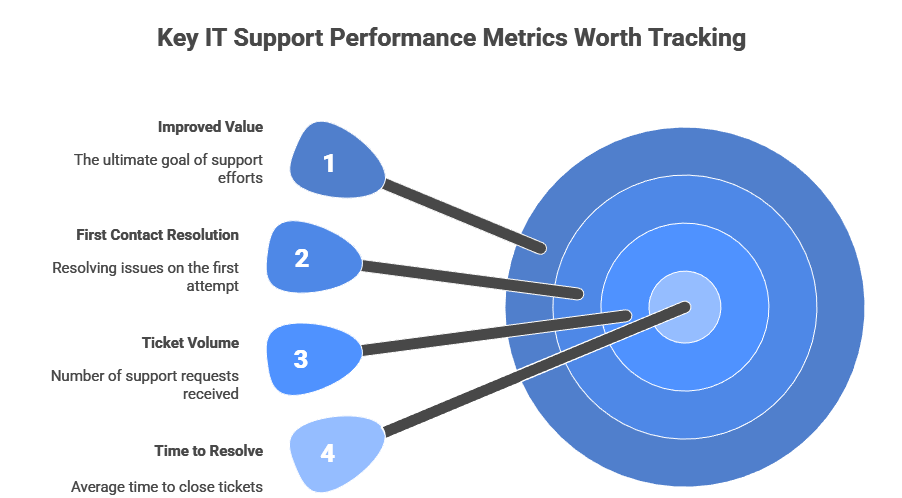
Set clear performance indicators for support, such as time to resolve tickets, monthly ticket volume, or percentage of resolved issues on first contact. These metrics can help you spot trends where costs rise without better outcomes, letting you make changes that improve value.
Hold Regular Performance Review Meetings
Set annual or quarterly review meetings with your provider to discuss cost trends and support outcomes. These meetings provide a structured space to address any repeat issues or scope mismatches before they become ongoing expenses. Regular reviews also help you adjust services proactively instead of waiting until contract renewal time.
Practice Contract Management
Look at your existing IT support contract terms closely before renewal. Negotiating terms based on actual usage patterns or growth expectations can reduce automatic price increases and align costs with real needs. Regular contract reviews can also identify services that no longer provide value or should be adjusted.
Train Internal Staff to Reduce Support Needs
A small investment in training non-IT staff on common issues can reduce the number of basic support calls that your provider must cover by as much as 20%-30%. That’s because teaching people basic troubleshooting skills decreases the number of calls they need to make. This also shifts your support team’s focus to higher-value technical needs rather than answering common questions.
|
Atlanta’s Leading IT Professionals Are Here to Help! |
||
Reach Out For Small Business IT Support Pricing From Network 1 Consulting
Network 1 Consulting provides small businesses with clear, reliable IT support that fits how they actually work. We handle the day-to-day technology tasks that keep your business running, from user support and system monitoring to patching, security controls, backups, and vendor coordination.
Our IT support pricing reflects the real scope of work required to support your users, devices, and systems. We build support plans around your environment, your risk tolerance, and your growth goals. This approach helps you avoid overpaying for services you do not need while still covering the areas that matter most.
Alongside IT support services, we also provide cybersecurity, IT outsourcing, IT consulting, cloud services, and more!
Talk to us today for your quote.