 Do you ever browse your iPhone and land on a site cluttered with multiple ads and pop-up windows? It’s frustrating, and it makes even the simplest article a chore to read. Between banner ads, autoplay videos, and pop-ups begging for your email address, it’s easy to lose track of what you actually opened the page to see.
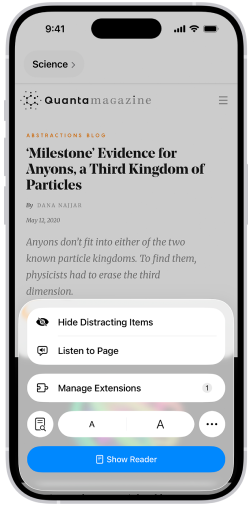
Safari has a built-in fix for this. On supported webpages, tap the button shown in the address bar and select “Show Reader.” This instantly clears the page of distracting clutter and lets you focus on the content you actually want to read. Reader also adjusts text size and formatting, making pages easier to read on a smaller screen.
If a few stubborn ads or pop-ups still linger, tap “Hide Distracting Items” from that same menu, then tap each individual ad or pop-up to remove it manually. This feature learns your preferences over time, so pages you visit frequently should stay cleaner on future visits. In just a few taps, you’ll turn a cluttered, ad-heavy page into a clean, distraction-free read.
Give Safari’s Reader mode a try next time a cluttered page gets in your way, it’s a quick habit that makes browsing on your iPhone noticeably more pleasant. A few taps is all it takes to trade in the clutter for a cleaner, more focused read.