Table of Contents
As businesses grow, so does the complexity of protecting their technology. Remote staff, cloud applications, client data, vendor portals, Microsoft 365, servers, firewalls, and employee devices all create new opportunities and new risks. Protecting that environment requires much more than a firewall or antivirus software.
At Network 1 Consulting, our 25 years of experience have shaped a practical view: security is not one tool. The right network security controls work together to reduce downtime, strengthen security, improve audit readiness, and keep your business running.
David Gracey, Founder & President at Network 1 Consulting, notes: “Security decisions improve when leaders connect each control to a workflow, who approves access, who sees alerts, and how remediation gets documented.”
Network Security Types That Protect Daily Operations
Effective network security isn’t about preventing cyberattacks. It gives business leaders the confidence to adopt new technologies, support remote work, meet compliance requirements, and grow without introducing unnecessary risk. So, before you approve a new tool, invoice, or vendor change, it is important to understand which layer protects which workflow.
A laptop alert, firewall rule, phishing email, and access request all create different business risks. Social Engineering at 23% and Basic Web Application Attacks at 17% changed places in the lineup, while System Intrusion remains in first place at 42%, so controls need to match how work gets done.
-
Endpoint protection and response: Laptops, desktops, and servers need detection, response, and patching so one infected workstation does not become delayed orders, escalated tickets, or exposed files. Our 1-Guard Security Suite provides a required baseline that includes endpoint detection and response, patching support, and employee cyber safety training.
-
Managed firewall oversight: Firewall rules, firmware, warranties, and replacement planning affect remote access, vendor portals, and branch connectivity. Old rules create exposure and make troubleshooting harder.
-
Email security and training: Filtering and employee training reduce invoice fraud, credential theft, and unnecessary support tickets while creating a repeatable security process.
-
Identity and access controls: MFA and access approvals help prove who can reach Microsoft 365, shared folders, and business systems during audits. They also reduce the scramble when an employee changes roles or leaves.
The next step is to connect each layer to the risks it reduces across the environment.
Types Of Network Security For Reducing Business Risk
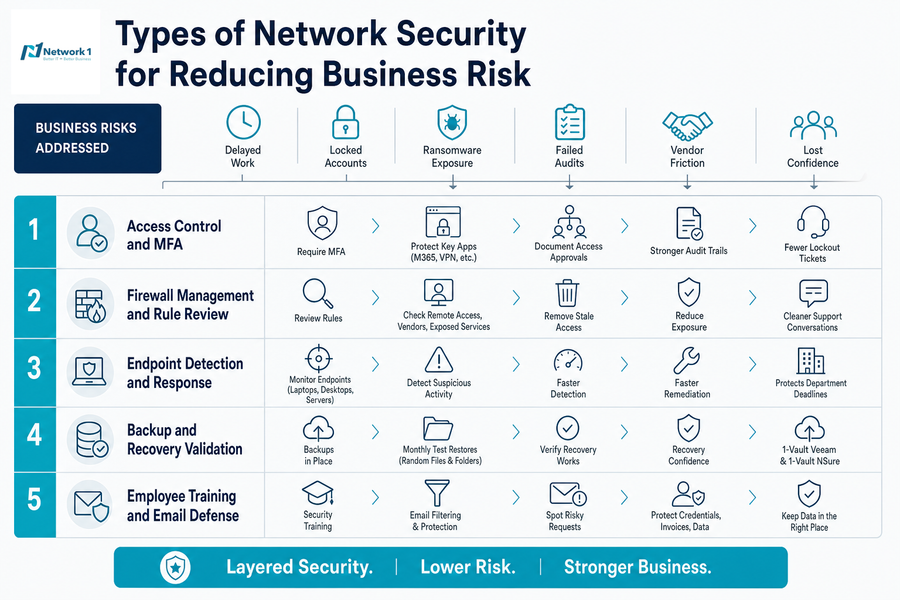
Risk shows up as delayed work, locked accounts, ransomware exposure, failed audits, vendor friction, and lost confidence when a client asks whether their data is protected. The most useful types of network security connect directly to those consequences.
-
Access control and MFA: Require MFA for Microsoft 365, VPN, and sensitive apps, then document access approvals during role changes. That creates cleaner audit trails and fewer emergency lockout tickets.
-
Firewall rule review: Review rules tied to remote access, vendor systems, and exposed services. Removing stale access reduces unnecessary exposure.
-
Endpoint detection and response: EDR watches laptops, desktops, and servers for suspicious behavior. Faster detection supports faster remediation before a workstation issue affects a department deadline.
-
Backup and recovery validation: Backups matter because recoveries must work. For 1-Vault Veeam and 1-Vault NSure clients, we perform monthly test file restores on random files and folders.
-
Employee training and email defense: Training and filtering help employees spot risky requests before credentials, invoices, or customer data move to the wrong place.
Types Of Encryption In Network Security Across Users And Data
A traveling employee leaves a laptop in a rideshare after downloading a cloud file share with customer or patient data. Encryption helps keep data unreadable to unauthorized people when devices, files, or traffic are exposed, but it works best as part of a broader plan.
The types of encryption in network security should be selected around how people work, where data lives, and what evidence you need if something goes wrong.
-
Drive encryption: Our 1-Ncrypt hard drive encryption helps reduce exposure from lost or stolen laptops and workstations, especially for employees working from client sites, airports, homes, and shared spaces.
-
Encrypted remote connections: Secure connections for remote work and cloud access protect traffic when employees use hotels, home networks, or other offsite connections.
-
Microsoft 365 protections: Email and Microsoft 365 security settings, including identity controls and domain protections, help reduce unauthorized access to mailboxes and shared files.
-
Protected backup data: Backup protection and recovery planning matter when customer files, accounting folders, or server data must be restored with confidence.
When a laptop or other device is lost or stolen, encryption is only part of the response. Organizations also need documented access approvals, recovery procedures, and the ability to demonstrate that sensitive information remained protected.
Encryption delivers the most value when combined with identity management, endpoint protection, Microsoft 365 hardening, and validated backups.
Keep Strengthening Your Network Security
Types Of Scanning In Network Security That Reveal Hidden Gaps
What happens when leadership receives vendor reports, patch alerts, firewall notifications, and Microsoft 365 warnings with no clear remediation plan?
The types of scanning in network security are useful only when your team prioritizes, assigns, remediates, documents, and reviews findings. That discipline matters because teams now have more vulnerabilities to evaluate, with nearly 30,000 discovered a year, or 80 a day. Application exposure is also rising: critical vulnerabilities in web applications were up 150 percent and high vulnerabilities increased 60 percent in 2024 vs. 2023. Public-facing applications appeared in nearly 40 percent of Cisco Talos Incident Response engagements, which reinforces why scanning needs a remediation workflow.
Vulnerability scanning should identify missing patches and weak configurations on servers, workstations, and exposed systems. Dark web alert reviews help determine whether employee credentials require password resets, MFA checks, or account cleanup. Email and domain record checks, including DMARC, DKIM, and SPF, help reduce spoofing that can lead to invoice fraud. Active Directory and Microsoft 365 reviews expose stale users, risky permissions, and settings that weaken audit readiness.
In our technical assessments, we focus on red flags that affect daily operations: unsupported systems, risky access, weak Microsoft 365 settings, firewall exceptions no one owns, and missing documentation. Findings create value only when they become a remediation plan.
-
Assign each finding to an owner with a due date.
-
Open vendor tickets for firewall, software, or cloud platform remediation.
-
Schedule patching around accounting, production, or client deadlines.
-
Document access cleanup and security changes for audit evidence.
-
Review monitoring alerts, with our eyes on alerts starting at 5 AM on workdays and critical server-down situations addressed.
Strengthen Every Security Layer
Network security works best as a coordinated plan. Talk with Network 1 Consulting about the right controls for your Atlanta business.
Different Types Of Network Security Working As One Plan
Individual controls matter, but the business value comes from how they work together through monitoring, support, remediation, documentation, and planning. We help align different types of network security through infrastructure analysis, customized security plans, proactive threat protection, swift remediation, employee cyber safety training, and monitoring during defined service coverage.
Our approach combines layered security, the 1-Guard Security Suite, responsive support, and end-to-end IT support through one vendor and one invoice, with no long-term lock-in under our service terms.
If you want a practical review of your current environment, contact Network 1 Consulting to identify gaps, reduce cyber risk, protect employees wherever they work, and keep critical systems running before the next laptop alert, access request, or vendor report turns into a business interruption.
Explore Cybersecurity Services in Atlanta